

Description
Protect your WooCommerce store from “item not as described” disputes, chargebacks, and false
damage claims — with automatic video proof of every order before it ships, plus optional buyer
approval before the package ever leaves your warehouse.
PallasMark records short video or photo proof of your orders during packing, and can require the
buyer to review and approve that proof before you ship. If a dispute or chargeback happens later,
you have timestamped, tamper-evident order proof showing exactly what left your warehouse and
when — turning a “he said, she said” argument into an open-and-shut case backed by evidence.
Typical use cases: high-value or fragile orders where “item not as described” claims are common,
sellers who’ve been burned by chargebacks before, warehouses and 3PLs that want a documented,
timestamped fulfillment record, and any WooCommerce store that wants proof of delivery beyond a
courier’s tracking number.
This plugin automates the whole connection: paste a one-time connect token from your PallasMark
account, click Connect to PallasMark, and the plugin registers itself with PallasMark and
creates the order.created / order.updated webhooks on WooCommerce’s modern REST API
(wp_api_v3) — using the single webhook secret PallasMark actually verifies, so there’s nothing
left to copy between the two systems by hand.
What this plugin does:
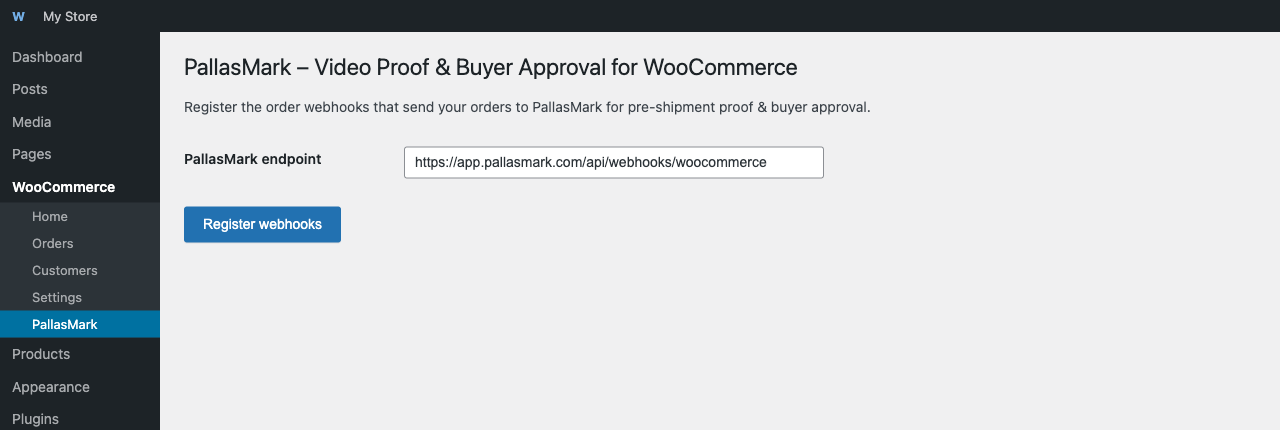
- Adds a WooCommerce PallasMark settings page.
- On your click, calls PallasMark with your one-time connect token and this store’s URL, receives
back a webhook secret, and creates the order webhooks pointed at PallasMark using that secret —
no manual webhook setup in WooCommerce Settings Advanced Webhooks, and nothing to
copy-paste into PallasMark yourself. - Re-running “Connect to PallasMark” is safe — it replaces any previous PallasMark webhooks
instead of creating duplicates.
What this plugin does NOT do: it does not send any order data anywhere by itself outside of
the explicit setup action described above. Once connected, WooCommerce’s own webhook delivery
system sends the order payload to PallasMark whenever triggered by real order activity. You still
need a PallasMark account to receive and use that data — this plugin is
the WooCommerce-side half of the connection, not a full product on its own.
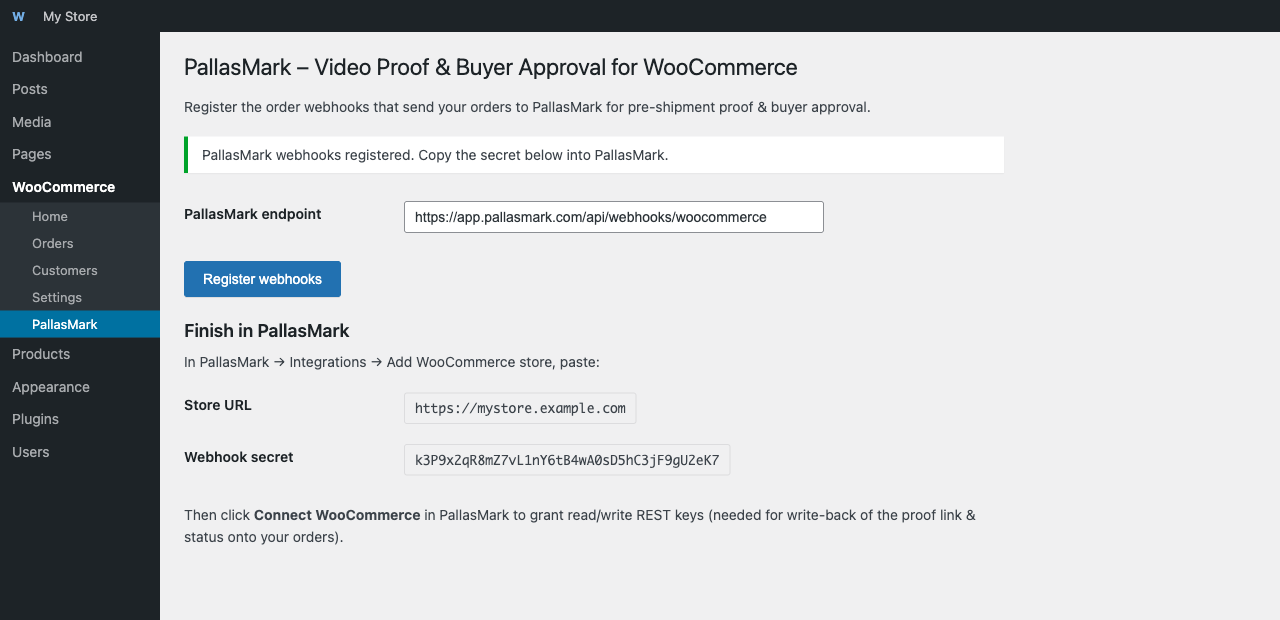
After connecting here, you’ll also need to click Connect WooCommerce inside PallasMark
(Integrations page) to grant a read/write REST API key pair — this is what lets PallasMark write
the proof link and approval status back onto your orders. The webhook connection alone only lets
orders flow in; the REST key is what lets status flow back.
External service disclosure: PallasMark is a hosted Software as a Service product, and this
plugin talks to it in two distinct ways:
- Install ping (automatic). On activation, on deactivation, and at most once every 24 hours
while active, the plugin sends this site’s own public URL plus the plugin/WordPress/WooCommerce
version numbers to PallasMark — nothing else, no order/customer/product data. This lets
PallasMark know your store has the plugin installed so we can reach out with setup help if you
haven’t connected yet; it does not require or create a PallasMark account. See == Privacy ==
below. - Store connection (explicit, your click). When you paste a connect token and click
Connect to PallasMark, the plugin (a) calls PallasMark’s registration API with that token
and this site’s URL to obtain a webhook secret, and (b) configures WooCommerce to send
order-created and order-updated webhook payloads to the PallasMark service going forward.
Depending on the order, those payloads may include customer contact, billing, shipping,
product, and order-status data.
Use of the service is subject to the
PallasMark Terms of Service and
Privacy Policy.
Privacy
This plugin sends data to PallasMark (app.pallasmark.com, or a different URL if you’ve configured
one on the settings page) in the two situations described above. Summary of what’s sent and when:
- On activate / deactivate / a throttled daily heartbeat: this site’s URL (
home_url()) and
the plugin/WordPress/WooCommerce version numbers. No order, customer, or product data — this
happens automatically, without a click, so it needs to stay minimal by design. - Only when you click “Connect to PallasMark”: a webhook secret exchange (your connect token
- this site’s URL), and from then on WooCommerce’s own order webhook payloads (which can include
customer/order data) for as long as the connection stays active.
- this site’s URL), and from then on WooCommerce’s own order webhook payloads (which can include
Deactivating or uninstalling the plugin stops all of the above. See PallasMark’s
Privacy Policy for how that data is handled once received.
Privacy == section for the full breakdown of what’s sent and when.
What happens if I deactivate the plugin?
The webhooks it created remain registered in WooCommerce (visible under WooCommerce Settings
Advanced Webhooks) until you delete them manually or reactivate the plugin and re-register
(which replaces them). Deactivating the plugin does not disconnect your PallasMark account, and
stops the automatic install ping described above.
I previously used the “drProof” plugin — do I need to do anything?
Re-running Register webhooks on this version automatically removes any leftover webhooks from
the old plugin name and endpoint, and creates fresh ones pointed at the current PallasMark
endpoint.
Screenshots
Installation
- Upload the plugin files to
/wp-content/plugins/pallasmark-for-woocommerce, or install the plugin through the WordPress plugins screen directly. - Activate the plugin through the Plugins screen in WordPress — you’ll find it under WooCommerce PallasMark.
- Click Log in to PallasMark on that page. No account yet? Create one free from the same screen (14-day Pro trial, no card required) — it already knows this is a WooCommerce store.
- In PallasMark, click Get connect token and copy the code it shows you.
- Switch back to your WordPress tab, paste the code, and click Connect to PallasMark.
- Back in PallasMark, click Connect WooCommerce to finish granting write-back access (lets PallasMark write the proof link and approval status back onto your orders).
FAQ
-
Does this actually help with chargebacks and disputes?
-
Yes — that’s the point. PallasMark keeps a timestamped video/photo record of what was packed and
shipped for every order, so if a buyer claims “item not as described,” “item never arrived,” or
files a chargeback, you have evidence to respond with instead of just your word against theirs. -
Do I need a PallasMark account?
-
Yes, but you don’t need to create it separately first — click Log in to PallasMark on this
plugin’s settings page and you can sign up for a free account (14-day Pro trial, no card required)
right from there, with this store already attached. -
Can buyers see and approve the proof before I ship?
-
Yes, that’s optional and configurable in PallasMark: turn on buyer approval and the order won’t
ship until the buyer reviews the video/photo proof and approves it — or you can run PallasMark in
record-only mode and just keep proof on file without blocking shipment. -
Is my data sent anywhere else?
-
The plugin only talks to the PallasMark URL you configure (default:
app.pallasmark.com). It
sends this site’s URL and version numbers automatically (on activate/deactivate and a throttled
daily heartbeat — no order data), and sends order webhook data only after you explicitly click
Connect to PallasMark. See the Description tab above (“External service disclosure”) and the
Reviews
There are no reviews for this plugin.
Contributors & Developers
“PallasMark – Video Proof & Buyer Approval for WooCommerce” is open source software. The following people have contributed to this plugin.
Contributors
Translate “PallasMark – Video Proof & Buyer Approval for WooCommerce” into your language.
Interested in development?
Browse the code, check out the SVN repository, or subscribe to the development log by RSS.
Changelog
1.0.8
- Added a lightweight “install ping” on activate/deactivate and a throttled daily heartbeat —
sends only this site’s URL and version numbers to PallasMark (no order/customer/product data),
disclosed in full under the new == Privacy == section. Lets PallasMark know a store has the
plugin installed even before an account exists, for support/setup outreach. - Rewrote the plugin listing (description, tags, FAQ) to better reflect what merchants actually
search for — chargeback protection, dispute protection, proof of delivery. - Simplified the Installation section into one unified flow (the “already have an account” /
“new to PallasMark” split was redundant since 1.0.7 — both cases now use the same login screen).
1.0.7
- Changed the “New here?” button to go to PallasMark’s login screen instead of straight to
signup — merchants who already have an account (adding a second store) were being pushed
toward creating a duplicate one; login still offers a “create account” link for those who
truly have none, with the same store info carried through. - Clarified the connection steps on this page with a numbered 1-2-3 list instead of a single
paragraph.
1.0.6
- Added a “Create a free PallasMark account” button for merchants who install this plugin
directly from the WordPress.org search results without a PallasMark account yet — it opens
signup with this store’s URL already attached, so PallasMark’s onboarding can skip straight
to a connect token instead of a generic setup screen.
1.0.5
- Replaced the manual “copy a plugin-generated secret into PallasMark” step with a one-time
connect token: paste it once, click Connect, and the plugin registers itself with PallasMark
automatically. The previous flow had no way to actually get the plugin’s secret into PallasMark,
so webhook signature verification could never succeed — this fixes that.
1.0.4
- Declared WooCommerce as a required plugin dependency.
1.0.3
- Confirmed compatibility with WordPress 7.0 and WooCommerce 10.9.
- Added the external-service, data-transfer, Terms of Service, and Privacy Policy disclosure
required for transparent PallasMark SaaS integration. - Fixed translation-domain declarations so the plugin passes WordPress.org Plugin Check.
- Updated the plugin homepage to a live PallasMark URL.
1.0.2
- Plugin title expanded to “PallasMark – Video Proof & Buyer Approval for WooCommerce” —
the plain brand name alone isn’t a keyword anyone searches the plugin directory for; the
functional description improves discoverability without stuffing the title with unrelated
keywords (search-relevant terms live in Tags/description instead, per directory guidelines).
1.0.1
- Renamed from “drProof for WooCommerce” to “PallasMark for WooCommerce” (product rebrand).
- Fixed the default endpoint, which still pointed at the retired drproof.com domain instead of
app.pallasmark.com. - Re-registering webhooks now also cleans up old drProof-named webhooks left over from the
previous plugin name, not just PallasMark-named ones. - Added translator-ready strings (text domain:
pallasmark-for-woocommerce).
1.0.0
- Initial release.