
Description
AI Search for WooCommerce makes your store’s search actually work. When a shopper types “ summer blue dress” they find your “ light cotton navy sundress” . When they search “ headphones for running” they find your sweat-resistant wireless earbuds — even if the word “ running” isn’t anywhere in the product description.
Default WooCommerce search matches keywords. AI Search matches meaning. It reads your entire product catalog — titles, descriptions, SKUs, categories, tags, and attributes — and converts each product into a vector that captures what it actually is. When a shopper searches, the plugin finds the closest matches by meaning, not by exact word overlap.
The result: fewer empty search pages, more products surfaced for long-tail queries, and shoppers who find what they wanted on the first try.
Also works with blog posts, pages, and any custom post type — so you can use the same intelligent search across your whole site.
Key Features
- WooCommerce Product Search: Full product catalog indexing — titles, short and long descriptions, SKUs, categories, tags, and product attributes (size, color, material, etc.). Pre-configured defaults so you can go live in minutes.
- Understands Shoppers, Not Just Keywords: Semantic search means “ cozy winter sweater” matches your “ merino wool pullover” . Long-tail and descriptive queries stop returning empty pages.
- Cross-Lingual & Multilingual: Works with 100+ languages — Portuguese, Spanish, French, German, Greek, Arabic, Chinese, Japanese, and more. International stores get consistent search quality across every language, and an English query can still match content in other languages.
- SKU & Attribute Matching: Customers can search by SKU fragments, attribute values, or technical specs and still find the right product.
- Smart Fallback System: 4-tier fallback ensures shoppers never hit a zero-result page — if AI search finds nothing, standard WordPress search takes over automatically.
- No OpenAI Account Required: Uses our free embedding service (up to 10,000 embeddings per site). Works out of the box for most stores.
- Bring Your Own API Key: Optionally use your own OpenAI API key for unlimited indexing.
- Bulk Embedding Generation: Index your entire existing catalog in one click, filtered by post type or category.
- Quota Management: Real-time monitoring of AI service usage and limits (v1.14.0+).
- Works Beyond Products Too: Same intelligent search for blog posts, pages, and any public custom post type.
- ACF Compatible: Index Advanced Custom Fields data for deeper product metadata search.
- Tunable Similarity Threshold: Fine-tune how strict or broad search results are, per store.
- Intelligent Caching: Fast results with automatic local caching.
Perfect For
- WooCommerce stores with large or varied product catalogs
- Fashion & apparel stores where shoppers describe products in their own words (“ something flowy for summer” )
- Electronics & home goods stores with complex technical specs and model numbers
- Books, media, and marketplaces with thousands of titles
- International stores selling in multiple languages
- Membership sites, knowledge bases, and directories — any content-heavy WordPress site
How It Works
- Each product in your WooCommerce catalog is converted into a numeric “ meaning fingerprint” (called an embedding) that captures its title, description, SKU, categories, tags, and attributes.
- When a shopper types a search query, their query gets its own fingerprint in the same way.
- The plugin compares the query’s fingerprint against every product’s fingerprint and returns the closest matches by meaning — not just by word overlap.
- Results are ranked by relevance, so the products shoppers actually want appear first.
- If no semantic matches pass the threshold, a 4-tier fallback kicks in so shoppers never hit an empty results page.
Embeddings are generated automatically when you publish or update products — no manual work after setup.
Learn More
Visit our website for documentation, demos, and examples:
https://wp-search.ai/
Browse technical documentation, see live demos of the plugin in action, and learn best practices for AI-powered search.
Usage
- Your existing WooCommerce search form (and the default WordPress search) are automatically upgraded — no theme or template changes required.
- Manage settings, switch providers, and monitor quota via the AI Search menu in your WordPress admin.
External Service
This plugin connects with:
- OpenAI Embeddings API: https://platform.openai.com/docs/guides/embeddings
- Custom Node.js Embedding Service
Please read more here:
https://platform.openai.com/docs/guides/embeddings
Screenshots
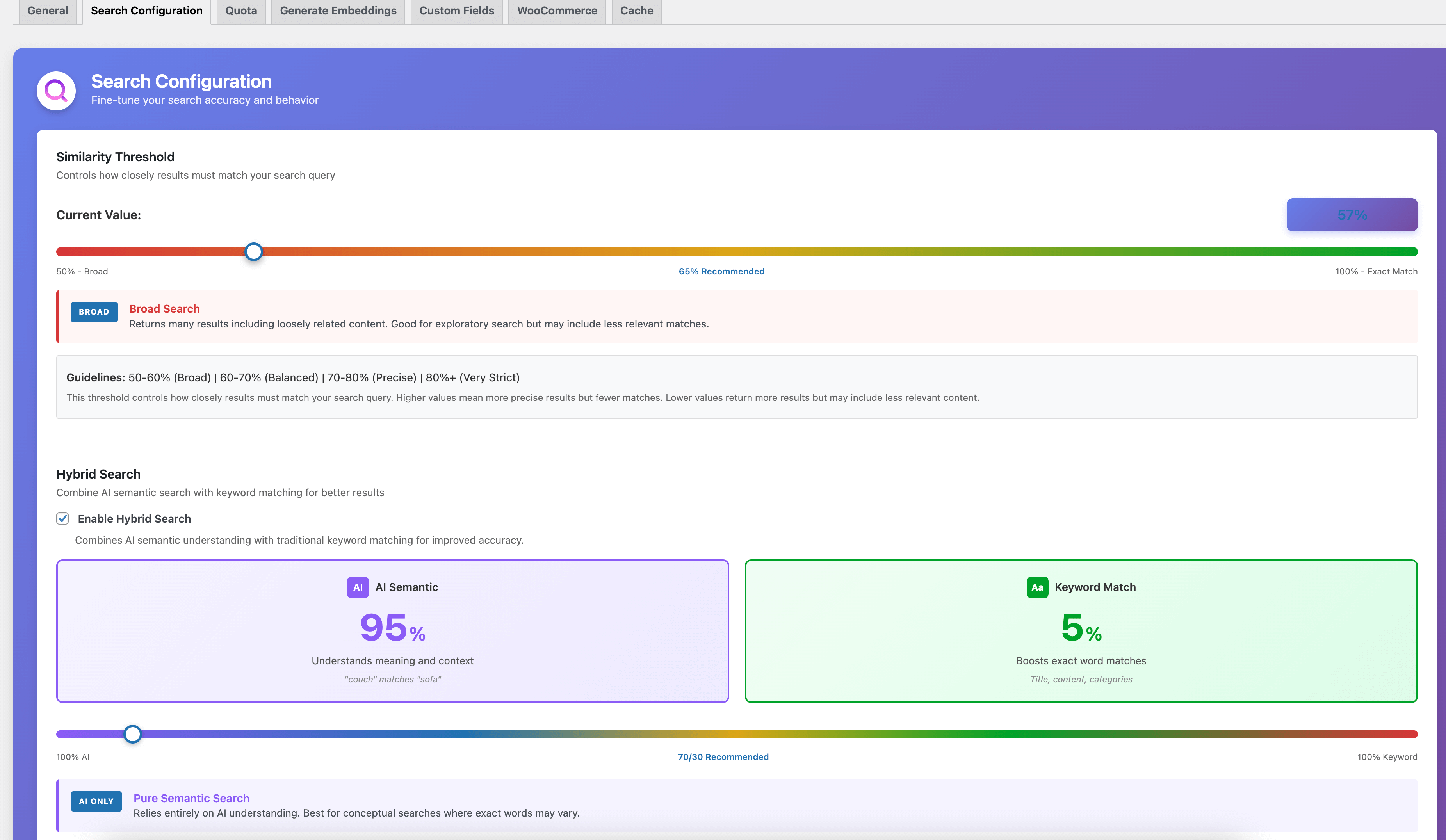
AI Search Dashboard – Configure search settings, similarity threshold, and hybrid search balance 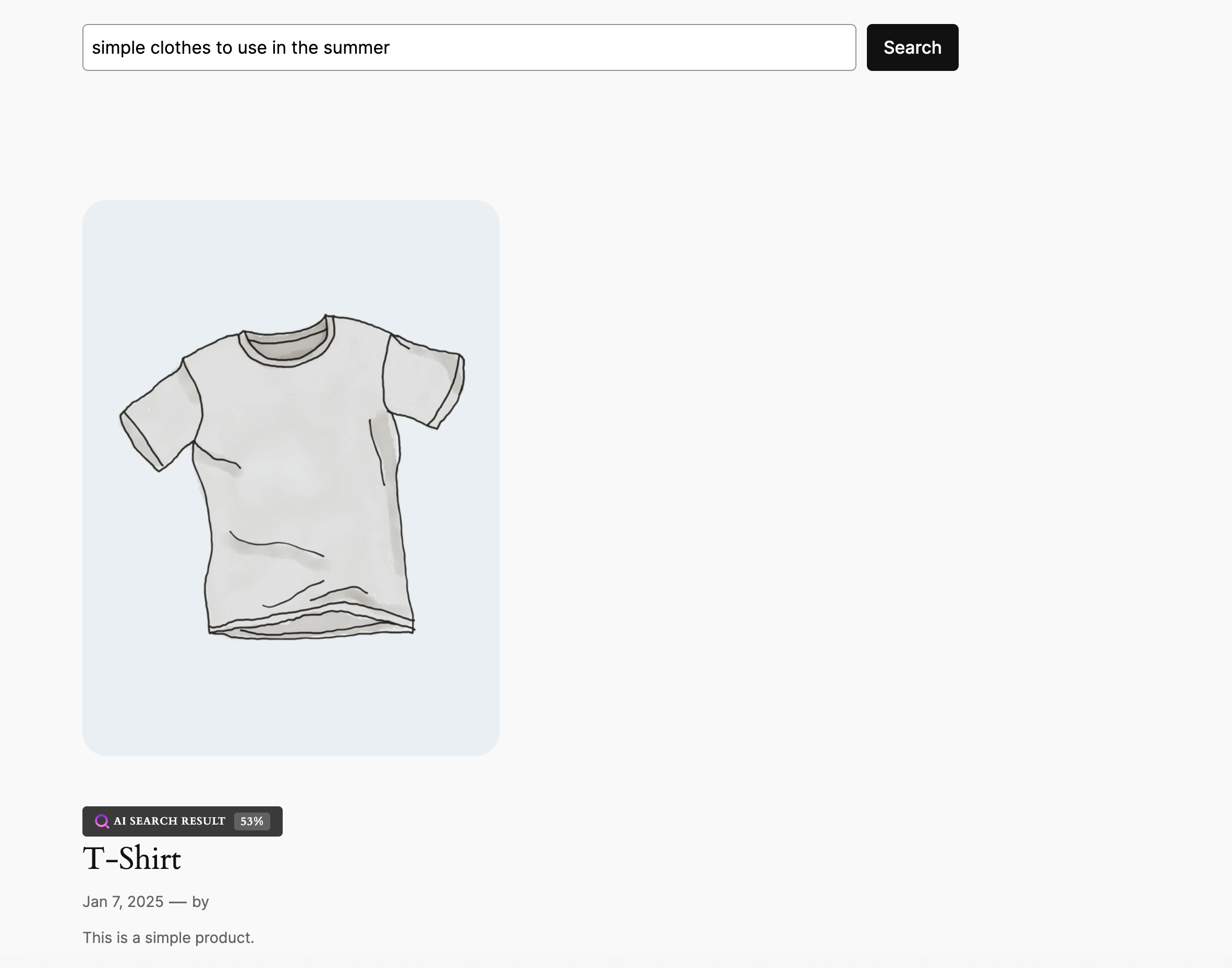
AI Search results on the frontend – Badge showing similarity score (visible to admins only by default)
Installation
- Install and activate the plugin through the ‘Plugins’ menu in WordPress.
- The setup wizard launches automatically. If you have WooCommerce active, it will detect your store and pre-select the most useful product fields (short description, categories, attributes, SKU).
- Run Bulk Embedding Generation from AI Search > Generate Embeddings to index your existing product catalog (or posts/pages).
- That’s it — new and updated products get indexed automatically from this point on.
FAQ
-
Can developers customize behavior via PHP hooks?
-
Yes. As of v1.25.0, AI Search exposes the following filters for developers:
ai_search_embedding_content— Modify the text sent to the AI provider when generating embeddings. Useful for injecting taxonomy names, stripping boilerplate, or normalizing terminology.ai_search_should_generate_embedding— Return false to skip embedding generation for specific posts. Useful for excluding drafts in certain categories or low-content posts.ai_search_query_before_embedding— Rewrite the user’s search query before it’s embedded. Useful for synonym expansion, spell correction, or locale-specific normalization.ai_search_similarity_threshold— Override the similarity threshold per-query or per-post-type. Useful for stricter matching on products vs. looser on blog content.ai_search_results— Re-rank or filter the final search results. Useful for boosting in-stock products, hiding restricted content, or injecting pinned results.
Plus existing filters:
ai_search_searchable_post_types,ai_search_highlight_color,ai_search_highlight_text_color. Code examples are included in the inline PHPDoc above each filter in the plugin source. -
Does this work with WooCommerce products?
-
Yes — WooCommerce is the primary use case. The plugin indexes product titles, short and long descriptions, SKUs, categories, tags, and product attributes. When you activate the plugin on a store with WooCommerce, the setup wizard automatically prioritizes products and pre-selects the most useful product fields.
-
Can shoppers search by SKU?
-
Yes. SKUs are included in the product’s embedding, so a shopper can type a full or partial SKU and still find the product — even when combined with natural language (“ black shoes SKU-2024” ).
-
Does it work with WooCommerce product attributes?
-
Yes. Attributes like size, color, material, and any custom attributes you configure are indexed as part of the product’s searchable content. Shoppers can search by attribute values (“ large cotton” ) and the plugin will match products with those attributes.
-
Does it index product variations?
-
The plugin indexes the parent product (including its attributes and description). Individual variation-level descriptions aren’t separately indexed, but since attributes like size and color are included in the parent’s embedding, searches for variation-specific terms still surface the right product.
-
What is required to use AI Search?
-
Nothing if you use our free AI Search Service (up to 10,000 embeddings per site). If you want unlimited indexing, you can use your own OpenAI API key.
-
What happens if the embedding API fails?
-
The plugin logs the error and falls back to WordPress default search automatically, so shoppers never hit a broken search page.
-
When are embeddings generated?
-
Embeddings are automatically generated when you publish a post, page, or custom post type. You can also regenerate them manually from the post editor or bulk generate them from the settings page.
-
Will this slow down my website?
-
No. Embeddings are generated in the background when content is published, not during searches. Search results are fast because they use pre-computed embeddings stored in your database.
-
How many embeddings can I create with the free service?
-
The free AI Search Service provides 10,000 embeddings per site. For unlimited usage, you can use your own OpenAI API key.
-
Does this work with custom post types?
-
Yes! AI Search works with any public custom post type. You can select which post types to make searchable in the setup wizard or settings page.
-
Can I index custom fields (ACF, meta boxes)?
-
Yes! You can configure custom post meta fields to be included in the search index. This is perfect for ACF fields, custom taxonomies, and other metadata.
-
What is the similarity threshold?
-
The similarity threshold (0.1-1.0, displayed as 10%-100%) determines how closely search results must match the query. Higher values (70%-80%) give more precise results; lower values (30%-50%) return broader matches. The default is 30%, which is a good starting point for most stores — adjust down if shoppers see too few results, adjust up if results feel loosely related.
-
What happens if AI Search finds no results?
-
AI Search has a smart 4-tier fallback system that ensures users always get results, falling back to WordPress default search if needed.
-
How do I change my AI provider?
-
Go to AI Search > General Settings and switch between the free AI Search Service or your own OpenAI API key.
-
Is my search data private?
-
Yes. Search queries are processed through the embedding API but are not stored externally. All search results and embeddings are stored in your WordPress database.
Reviews


Contributors & Developers
“AI Search for WooCommerce – Intelligent Product Search” is open source software. The following people have contributed to this plugin.
Contributors
“AI Search for WooCommerce – Intelligent Product Search” has been translated into 1 locale. Thank you to the translators for their contributions.
Translate “AI Search for WooCommerce – Intelligent Product Search” into your language.
Interested in development?
Browse the code, check out the SVN repository, or subscribe to the development log by RSS.
Changelog
1.25.0
- Developer Extensibility: Five new PHP filter hooks for customizing search behavior without forking —
ai_search_embedding_content,ai_search_should_generate_embedding,ai_search_query_before_embedding,ai_search_similarity_threshold, andai_search_results. See the new “ Developer Hooks” FAQ for details.
1.24.0
- Token Recovery: When the AI Search Service no longer recognises your site’s token (e.g. after a service-side reset), the General settings tab now offers a one-click “ Reconnect with new token” button. Quotas and usage limits are preserved — only the credential rotates. The follow-up connection check runs automatically so you see the live status immediately.
1.23.1
- Bug Fix — Setup Wizard Final Step: Fixed a “ The link you followed has expired” error that blocked some users at the last step of the setup wizard on their first run. The CSRF nonce on the final-step form was failing verification in a subset of install scenarios; removed in favour of the capability check that was already in place.
1.23.0
- WooCommerce-First Experience: Repositioned for WooCommerce stores with tailored onboarding, product-priority defaults in the setup wizard, and a “ store detected” welcome banner
- Multilingual Search Documented: Confirmed and documented support for 100+ languages including Greek, Arabic, Chinese, Japanese, and all European languages (semantic search path)
- Bug Fix — PHP 8 DivisionByZeroError: Fixed a crash in cosine similarity when a stored embedding had zero magnitude (sqrt returns float 0.0, strict
=== 0comparison was bypassing the guard) - Test Suite Added: First-time PHPUnit-based test harness (unit + integration suites) covering similarity math and the external service client
- Documentation Fix: Corrected similarity threshold range in FAQ (0.1-1.0 since v1.18.0, previously documented as 0.5-1.0)
1.22.0
- Domain Mismatch Detection: Admin warning when site domain differs from the registered AI Search Service domain
- One-Click Reconnect: Button to easily reconnect and get a new token for the current domain
- Automatic Origin Tracking: Plugin now stores the registered origin for future mismatch detection
- Improved Migration Support: Better handling when moving sites between domains (staging to production, domain changes)
1.21.0
- Reusable CPT/Taxonomy Selector Component: New shared UI component for Post Type, Taxonomy, and Term selection
- Clear Embeddings by Post Type/Taxonomy: Delete embeddings for specific post types or taxonomy terms (not just all at once)
- Improved Cache & Clean Tab: Added filtered clearing option alongside existing “ Clear All” functionality
- UI Component Architecture: Introduced
components/folder for reusable admin UI elements - Code Refactoring: Reduced code duplication between Generate Embeddings and Cache & Clean tabs
- Taxonomy/Category Filter for Embeddings: Generate embeddings filtered by specific categories or taxonomies (not just post types)
- Dynamic Taxonomy Loading: Taxonomies and terms load dynamically via AJAX based on selected post type
- Improved Generate Embeddings UI: Cleaner form layout with loading states and better UX
1.20.0
- Performance Optimization for Large Sites: Major improvements for sites with thousands of posts
- Batched Processing: Posts are now processed in batches of 100 for optimal memory usage
- Search Results Caching: Results are cached for 5 minutes to speed up repeated queries
- Direct Database Queries: Optimized queries that fetch only necessary data
- Memory Management: Automatic cleanup between batches to prevent memory exhaustion
- New Default Threshold: Changed default similarity threshold from 65% to 30% for better out-of-box results
- Improved Threshold Guidelines: Updated slider recommendations (30% now recommended as starting point)
1.19.0
- Dedicated Admin Menu: AI Search now has its own top-level menu in WordPress admin (no longer under Settings)
- Improved Menu Navigation: Settings pages and Setup Wizard now correctly highlight the AI Search menu
- Contact the Author: New submenu link to contact the plugin author directly
- URL Structure Update: All admin URLs now use
admin.php?page=ai-searchfor better WordPress integration
1.18.0
- REST API Settings Endpoint: New public endpoint at
/wp-json/ai-search/v1/settingsexposing plugin configuration for debugging (no sensitive data) - OpenAI Model Selection: Choose between
text-embedding-3-small(default, recommended) andtext-embedding-3-largewhen using your own OpenAI API key - Extended Threshold Range: Similarity threshold now supports 10-100% (previously 50-100%) for broader search flexibility
- Updated Default Model: OpenAI embeddings now use
text-embedding-3-smallinstead of the oldertext-embedding-ada-002
1.17.0
- Hybrid Search: New feature combining AI semantic search with traditional keyword matching for improved accuracy
- Search Configuration Tab: Dedicated settings tab for fine-tuning search behavior (similarity threshold and hybrid search)
- Configurable Balance Slider: Adjust the weight between AI semantic search (0-100%) and keyword matching
- Enhanced Keyword Matching: Keyword scoring now includes custom fields and WooCommerce fields configured in settings
- Reusable UI Components: New slider components for threshold and hybrid balance configuration
- Improved Search Accuracy: Better ranking when exact keyword matches are important alongside semantic understanding
1.16.0
- Automatic Embedding Generation on Publish: Embeddings now generated automatically when posts/pages/custom post types are published
- Improved Performance: Removed automatic embedding generation on every save – now only triggers on publish status transition
- Universal CPT Support: Automatic embedding generation works seamlessly for all post types without additional configuration
- Post Meta Box Enhancement: Content quality indicator and embedding preview available for published posts only
- Better Resource Management: Reduced API calls by only generating embeddings when content is ready for public viewing
- Setup Wizard Updates: Final step now includes similarity threshold configuration with better default value (0.65)
- Admin Interface Improvements: Post Meta Box now provides clear status messages for unpublished posts
- Case-Insensitive Search: All content and search queries converted to lowercase for consistent matching
- Enhanced Similarity Display: AI Search badges now show percentage similarity scores on search results (editors/admins only)
- Fallback Search Improvements: Fallback results now calculate and display actual similarity scores instead of showing 0%
- Threshold Filtering on Fallback: All fallback search strategies now respect the similarity threshold setting
- CSS Classes for Results: Added
ai-search-similarity-{percentage}CSS classes to all search results for custom styling - Frontend Threshold Slider: Admins can test different threshold values directly on search results pages
1.15.0
- Enhanced Setup Wizard: Expanded from 3 to 4 steps with new custom fields configuration
- Custom Fields Step: New dedicated wizard step for choosing searchable content
- Content Richness Emphasis: Added messaging that “ richer content = better search results”
- Post Type Selection: Choose which post types (posts, pages, custom types) are searchable during setup
- WooCommerce Field Configuration: Configure product fields (SKU, categories, tags, attributes) in wizard
- Streamlined Admin Menu: Simplified submenu to General Settings, Setup Wizard, and Support Forum link
- Direct Support Access: Added WordPress.org support forum link directly in admin menu
- Improved Quota Display: Quota tab now shows relevant message for users with their own OpenAI API key
- Better Onboarding Flow: Setup wizard now guides users to configure content before generating embeddings
- Brazilian Portuguese Translation: Added pt_BR translation file for readme
1.14.0
- Quota Management Tab: New dedicated tab showing real-time usage statistics from AI Search Service
- Usage Monitoring: Visual progress bars displaying total embeddings and daily usage against limits
- Quota Status Indicators: Clear status badges showing if quotas are active or exceeded
- Manual Refresh: On-demand quota data refresh with intelligent 6-hour caching
- Detailed Error Messages: Enhanced error handling with specific API error messages
- Last Updated Timestamp: Human-readable “ last updated X ago” display for quota data
- Quota Manager Class: New dedicated controller class for quota management (separation of concerns)
- API Integration: Direct integration with
/clients/quotaendpoint using Bearer token authentication - Internationalization: All new quota strings fully translatable
1.13.0
- Top-Level Admin Menu: AI Search moved from Settings submenu to main WordPress admin menu (position 58, before Settings)
- Custom Menu Icon: Added plugin icon (SVG) to admin menu
- Full i18n Support: All admin settings pages now fully translatable
- Improved Admin UX: Better visibility and professional appearance in WordPress admin
1.12.0
- Automatic Service Registration: Plugin now registers with AI Search Service immediately on activation
- Setup Wizard Redirect: Users are automatically redirected to the setup wizard after plugin activation
- Simplified Settings UI: Removed service token field from settings – connection is now managed automatically
- Check Connection Button: Replaced “ Validate Token” with cleaner “ Check Connection” button showing usage stats
- Streamlined Onboarding: Better first-time user experience with automatic configuration
- Code Cleanup: Removed unused spelling suggestions and search highlighter classes
1.11.0
- Percentage-Based Threshold Display: Similarity threshold now displays as percentage (20-100%) instead of decimal (0.2-1.0) for easier understanding
- Public Badge Visibility Option: New admin setting to show AI Search badge to all visitors, not just editors/admins
- Removed Analytics Feature: Simplified plugin by removing search analytics dashboard and tracking
- Enhanced WooCommerce Documentation: Improved readme with eCommerce-specific keywords and use cases
- Visual Improvements: Redesigned similarity threshold section with prominent visual indicators
- No Emoji Policy: Removed all emojis from admin interface for professional appearance
- Website Launch: Added link to https://wp-search.ai for documentation and demos
1.10.1
- AI Search Result Badge: Visual badge displayed on search results powered by AI
- Shows “ AI Search Result” label with plugin icon
- Only visible to editors and administrators
- Tooltip explains visibility restriction
- Similarity CSS Classes: Added CSS classes to search result posts
ai-search-resultclass for AI-powered resultsai-search-similarity-{0-100}class with exact similarity percentageai-search-matchclass when result meets configured thresholdai-search-fallbackclass for non-AI fallback results
- Removed Frontend Notices: Removed the intrusive search feedback notices that were shown to all users
- Developer Enhancement: Similarity scores accessible via static properties for theme customization
1.10.0
- Search Analytics Dashboard: Track and analyze search behavior
- Log all search queries with result counts
- Click-through tracking on search results
- Popular queries and zero-result analysis
- Time-based statistics and trends
- CSV export functionality
- “ Did You Mean?” Spelling Suggestions: Intelligent spelling correction
- Vocabulary built from post titles and taxonomies
- Levenshtein distance-based word matching
- Cached suggestions for performance
- Search Term Highlighting: Visual feedback in search results
- Highlights matching terms in titles and excerpts
- Customizable highlight colors via filters
- Dark mode support
1.9.2
- Version Consistency: Fixed version mismatch between plugin header and internal constants
- Internationalization Ready: Added text-domain ‘ai-search’ and domain path for translation support
- Documentation Fix: Corrected similarity threshold range documentation (0.2-1.0)
- Developer Filter: Added
ai_search_searchable_post_typesfilter to customize which post types are searchable
1.9.0
- Enhanced Fallback Search System: Introduced intelligent 4-tier fallback mechanism for zero-result searches:
- WordPress default search fallback with result count display
- Broader semantic search with relaxed similarity thresholds
- Unprocessed content search for posts without embeddings
- Smart query suggestion system for completely failed searches
- User Feedback Notifications: Real-time search feedback system with dismissible notices:
- Visual indicators showing which fallback method was used
- Search result counts for transparency
- Automatic cleanup of feedback transients
- Contextual messaging for different search scenarios
- Interactive Threshold Demo: Professional threshold demonstration interface:
- Real-time product similarity visualization
- Sample clothing store dataset with summer search scenario
- Dynamic filtering based on threshold adjustments
- Performance indicators showing recall rates and precision levels
- Color-coded similarity scores and visual feedback
- Token Validation System: Comprehensive service token management:
- One-click token validation with detailed usage statistics
- Real-time quota monitoring (daily/total limits)
- Client information display including origin verification
- Error handling for invalid or expired tokens
- Setup Wizard Enhancement: Improved first-time user experience:
- Step-by-step configuration process
- Provider comparison with clear recommendations
- Visual progress indicators and smooth transitions
- Comprehensive completion flow
1.8.0
- Service Token Management: Added manual service token field in General Settings for better control and transparency
- Token Validation System: New “ Validate Token” button with real-time validation and detailed usage statistics
- Enhanced Admin Interface: Service token field automatically shows/hides based on provider selection
- Comprehensive Validation Results: Displays client ID, origin, daily/total limits, current usage, and quota status
- Improved Error Handling: Better error messages for token validation failures and connection issues
- User Experience Improvements: Loading spinner, button states, and clearer user guidance
- Debugging Enhancements: Added error logging for better troubleshooting and API response monitoring
1.7.0
- Major Performance & UX Improvements
- Service Registration Optimization: Moved AI service registration from plugin initialization to settings save, eliminating unnecessary API calls during normal page loads
- Cache Management Tab: Added comprehensive cache management interface with three clearing options:
- Clear embedding cache (transients) – safe regeneration
- Clear post meta embeddings – requires manual regeneration
- Clear all embedding data – complete reset option
- Enhanced Similarity Threshold**: Improved precision and range:
- Range changed from 0.0-1.0 to 0.2-1.0 (eliminates very low-relevance results while allowing broader searches)
- Precision increased from 0.01 to 0.001 steps (3 decimal places)
- Better user guidance and formatting
- Modular Code Architecture: Refactored service registration into isolated, reusable methods for better maintainability
- Real-time Cache Statistics: Display current cache size and post embedding counts
- Enhanced Error Handling**: Better user feedback when AI service is unavailable with automatic fallback
- Security Improvements: Enhanced nonce verification and user capability checks
1.6
- Replaced internal embedding storage with external service integration.
- Token-based authentication per origin.
- Restore original search in case there isn’t any AI results
- Solve fatal errors in case the vectors don’t have the same size
1.5
- Bulk embedding generation based on custom number of posts
1.4
- Settings UI Revamp: Introduced tabbed navigation to separate “ General Settings” and “ Generate Embeddings” for better organization.
- Batch Embedding Generation: Users can now trigger embedding generation for up to 50 posts at a time.
- Custom Post Type Selection: A dropdown was added, allowing users to choose which CPT they want to generate embeddings for.
- Embedding Optimization: Now only processes posts that do not yet have embeddings to avoid redundant API calls and improve performance.
- Security Enhancements: Added nonce verification to protect settings updates.
This update significantly improves usability, optimizes performance, and gives users more control over AI-powered search embeddings.
1.3
- Similarity Threshold Control: Added a range input field (0-1) in settings to allow users to adjust the similarity threshold dynamically.
1.2
- Cache Search embeddings, saved in transients for one day
1.1
- text-davinci-003 (deprecated) has been replaced bytext-embedding-ada-002 model
- db manipulation has been replaced by custom_post_meta approach
1.0
- Initial release, adding the settings page and the search filter.