Integrate Elementor Form With Mailster

Description

The Integrate Elementor Form With Mailster is a powerful, no-code integration solution for connecting Elementor Pro Forms directly with Mailster Newsletter lists.

Key Features:
* Dynamic List Management – Users can subscribe/unsubscribe from multiple lists in a single form submission
* Smart Subscriber Detection – Automatically detects existing subscribers and shows their current subscriptions
* Intelligent List Processing – Combines admin-selected defaults with user preferences seamlessly
* Custom Field Mapping – Map any Elementor form field to Mailster custom fields
* GDPR Compliance – Built-in timestamp tracking for consent management
* Double Opt-in Support – Full control over confirmation requirements
* Overwrite Protection – Choose whether to update existing subscriber data
* Real-time Preview – See exactly what users will experience in the Elementor editor
* Multi-language Support – Includes Portuguese (pt_BR) translations

Advanced Capabilities:
* Existing subscribers can manage their list subscriptions directly from your forms
* Visual indicators show current subscription status with “ Current” badges
* Automatic form reset after successful submissions for better UX
* Comprehensive error handling and debugging features
* Backward compatible with all existing forms

Screenshots

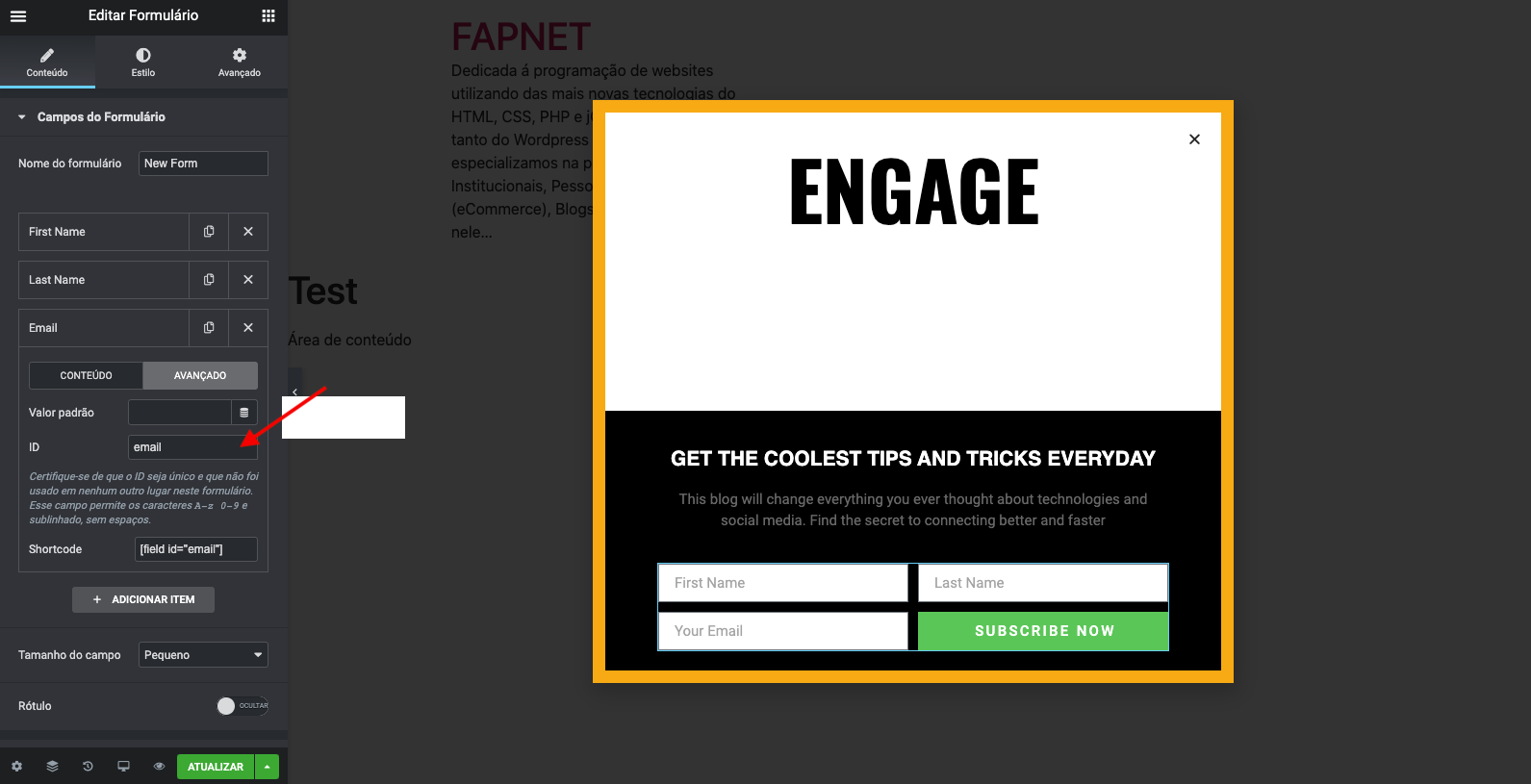
  • Update the ID Field on the form.
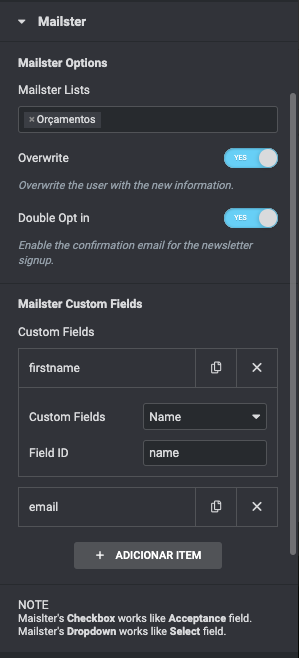
  • Inside Mailster tab, update the Field ID with the corresponding custom field.

Installation

Send the plugin files to the folder wp-content/plugins, or install it using WordPress Plugins.
Activate the plugin.

FAQ

What do I need to use this plugin?

  • Mailster – Email Newsletter Plugin for WordPress 2.0 or higher
  • Elementor 3.5.0 or higher
  • Elementor Pro 3.5.0 or higher
  • PHP 8.1 or higher

How to Setup

Basic Setup:
1. Add form fields (email, name, etc.) to your Elementor form
2. Update each field’s ID to meaningful names
3. Add “ Mailster” action in the form’s Actions After Submit
4. Configure default lists in the Mailster action settings
5. Map custom fields in the Custom Fields section

Advanced Features:
* User List Selection: Enable “ Allow User List Selection” and add a “ Mailster Lists” field to let users choose their subscriptions
* GDPR Compliance: Add an Acceptance field and map it to “ GDPR Consent” for automatic timestamp tracking
* Existing Subscribers: Users with existing accounts will see their current subscriptions automatically checked
* Dynamic Management: Users can add/remove list subscriptions in real-time

Pro Tips:
* Use the “ Lists Available for User Selection” to control which lists users can choose from
* Enable “ Show List Descriptions” to provide context for each mailing list
* Test with existing subscriber emails to see the dynamic subscription management in action

Reviews

စက်တင်ဘာ 9၊ 2021
Thanks a lot for providing this plugin. It helps a lot to integrate.
မေ 8၊ 2021
it worked perfectly for me. Thank you for making it available for free. congratulations!
ဇန်နဝါရီ 17၊ 2021
Thank you Fernando A. Perrella for such a great plugin! It works really great! I’ve been looking for such plugin for a long time. I’ve been using MailOptin to connect Elementor forms with Mailster, but there are some problems with loading lists now. “ Elementor Form Integration with Mailster” loads Mailster’s lists without any problem and works flawlessly. Again, thank you very much!
Read all 4 reviews

Contributors & Developers

“Integrate Elementor Form With Mailster” is open source software. The following people have contributed to this plugin.

Contributors

Changelog

1.6.0 – 2025/09/18

  • MAJOR: Dynamic subscription management for existing subscribers
  • NEW: Real-time subscriber detection and current subscription display
  • NEW: Visual “ Current” badges for existing subscriptions
  • NEW: Add/remove list subscriptions in single form submission
  • NEW: Automatic form reset after successful submissions
  • IMPROVED: GDPR compliance with proper timestamp tracking
  • IMPROVED: Enhanced field mapping with smart checkbox handling
  • IMPROVED: Better error handling and debugging capabilities
  • IMPROVED: Cleaner UI without unnecessary status windows
  • FIXED: All settings persistence issues (Overwrite, Double Opt-in)
  • FIXED: List confirmation status consistency
  • FIXED: PHP type conversion errors and fatal errors
  • ENHANCED: Complete Portuguese (pt_BR) translations
  • ENHANCED: Comprehensive code cleanup and optimization

1.5.1 – 2025/09/17

  • CRITICAL FIX: Fixed form submission not capturing user-selected lists
  • FIXED: Corrected HTML field naming to properly submit checkbox values
  • FIXED: Updated form processing logic to correctly identify and process user selections
  • FIXED: Show/hide descriptions toggle now works properly in editor preview
  • IMPROVED: Enhanced debugging capabilities for troubleshooting form submissions

1.5.0 – 2025/09/17

  • MAJOR IMPROVEMENT: Simplified user list selection system for better UX
  • NEW: “ Lists Available for User Selection” – dedicated multi-select field for admin to choose exactly which lists users can select
  • NEW: Live editor preview – Elementor editor now shows real-time preview of what users will see based on admin settings
  • SIMPLIFIED: Removed complex selection modes – now always uses simple “ add to defaults” behavior
  • SIMPLIFIED: Removed confusing “ Available Lists for Users” dropdown
  • IMPROVED: Much cleaner admin interface with intuitive controls
  • IMPROVED: Better form processing logic with enhanced security validation
  • IMPROVED: More informative editor messages when user selection is disabled or misconfigured
  • PERFORMANCE: Reduced code complexity and improved execution efficiency

1.4.0 – 2025/01/10

  • NEW: Added user-selectable mailing lists feature
  • NEW: Frontend form field for users to choose their preferred mailing lists
  • NEW: Admin control for enabling/disabling user list selection
  • NEW: Three selection modes: Add to defaults, Replace defaults, or Use as fallback
  • NEW: Option to show all lists or only admin-selected lists to users
  • NEW: Enhanced list descriptions display with improved styling
  • NEW: Responsive design for list selection field
  • IMPROVED: Better integration between admin defaults and user selections
  • IMPROVED: Enhanced CSS styling for better user experience
  • IMPROVED: Backward compatibility maintained for existing forms

1.3.0 – 2024/12/17

  • Updated minimum PHP requirement to 8.1
  • Updated minimum WordPress requirement to 6.0
  • Updated minimum Elementor requirement to 3.5.0
  • Added PHP 8.4 compatibility with proper type declarations
  • Improved code security with better input sanitization
  • Enhanced error handling and validation
  • Updated Elementor Pro API usage for latest compatibility
  • Improved JavaScript for modern WordPress/jQuery compatibility
  • Added responsive CSS styling
  • Fixed deprecated function usage
  • Better GDPR compliance handling

1.2.1 – 2023/03/22

  • Compatibility check for PHP 8.1

1.2.0 – 2020/11/02

  • Added Mailster GDPR option.

1.1.3 – 2020/10/07

  • Fix dependecies check.

1.1.2 – 2020/09/30

  • Added compatibility with elementor 2.9 since 3.0 changed core functionalities.

1.1.1 – 2020/09/20

  • Updating the description.

1.1.0 – 2020/09/20

  • Added better Mailster list selection with Select2 (note: review your list settings).
  • Added Maislter Custom Fields.

1.0.0 – 2020/08/11

  • First plugin version.
  • Multiple list.
  • Fields Email, First Name and Last Name.